00 Days
:
00 Hours
:
00 Minutes
:
00 Seconds
Black Friday / Cyber Monday
30% OFF all plugins
Including renewals
Nov 27–30, 2026
Welcome to the HappyVR builder interface. To help you navigate the system efficiently, the user interface is divided into six core operational zones. Each section serves a distinct role in creating, managing, and refining your virtual reality tours.
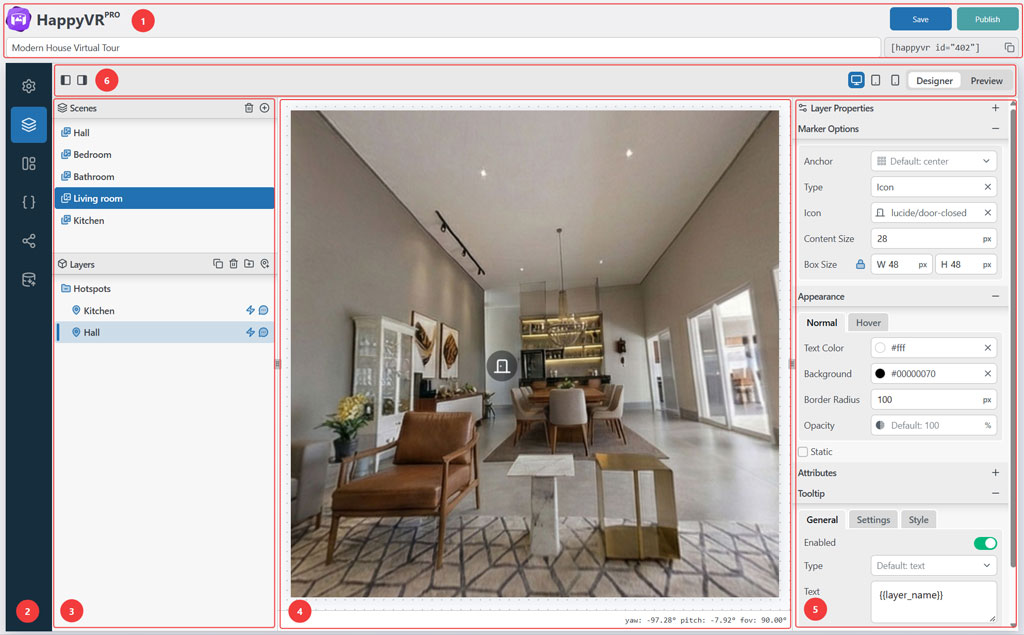
This area serves as the main project management hub. It displays the current project title, has a shortcode field for easy website integration, and buttons: “Save”, “Publish”, and “Switch to Draft”.
This vertical navigation dock allows users to switch between general virtual tour settings, scenes & layers management, virtual tour widgets (such as titles, zoom controls, fullscreen toggle, etc), custom CSS/JS code injection, share with embed code and the import/export utility.
This dynamic panel displays specific data and controls depending on the active item selected in the “Main Sidebar”. For example, it can show the “Scenes” list for managing scenes and the “Layers” list for organizing interactive markers and groups.
This central canvas is the main workspace for editing layers within the selected virtual tour scene. It allows users to drag and drop hotspots, rearrange elements, and easily navigate the scene panorama using the mouse control.
This inspector panel automatically displays the detailed properties and settings of the object selected in either the “Left Panel” or directly on the canvas. It enables users to customize element IDs, adjust positioning and sizes, style appearance parameters (such as fill, stroke, and opacity), configure interactive elements like tooltips, popups, custom actions and etc.
This control area allows you to switch seamlessly between “Designer” view (for editing) and “Preview” view (for testing), as well as show or hide the sidebar panels.
This structured overview provides the foundation for navigating the HappyVR environment confidently. By mastering these six core workspace areas, you can significantly accelerate your workflow and build highly engaging, interactive 360-degree virtual experiences for your audience.