00 Days
:
00 Hours
:
00 Minutes
:
00 Seconds
Black Friday / Cyber Monday
30% OFF all plugins
Including renewals
Nov 27–30, 2026
The General Settings section contains global configurations that affect the entire virtual tour component, its loading behavior, background styles, and navigation physics. They are grouped into collapsible sections and are saved into the corresponding fields of the tour config.
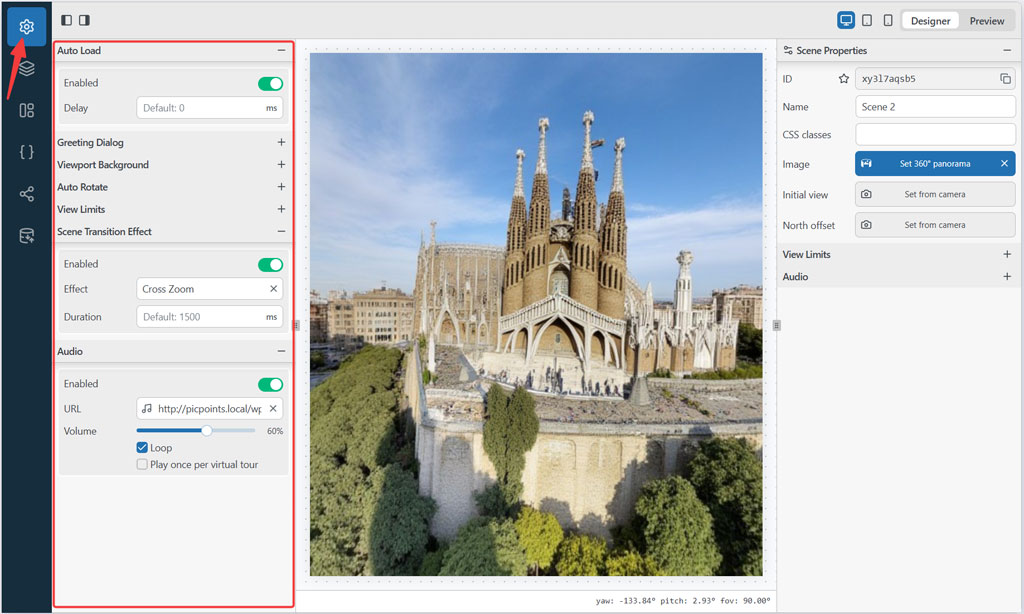
Automatically initializes and loads the virtual tour as soon as the page loads. When enabled, you can configure a specific loading delay (in milliseconds) to defer initialization if needed.
| Setting | Description |
|---|---|
| Enabled | Enables automatic tour loading when the player appears on the page. |
| Delay | Delay before the tour starts loading, in milliseconds. |
A modal window centered over the virtual tour that acts as a manual trigger when "Auto Load" is disabled. You can customize the text, upload a background or informational image, and style the modal to match your brand.
General Tab:
| Setting | Description |
|---|---|
| Enabled | Shows the greeting dialog before the tour starts. |
| Mode | Greeting content type: Text, Image. |
| Text | The greeting text. Multi-line. |
| Image | The greeting image, selectable from the WordPress Media Library. |
| Image Size | Image display size in pixels. |
Style tab:
| Setting | Description |
|---|---|
| Text Color | Text color of the greeting. |
| Background | Background color of the greeting. |
| Radius | Corner radius of the greeting block in pixels. |
Note: If both
"Auto Load"and"Greeting Dialog"are set to False, the virtual tour will fully load only when a user clicks anywhere directly on the virtual tour container.
Background rendered behind the panorama.
| Setting | Description |
|---|---|
| Enabled | Enables the custom viewport background. |
| Fill | Background color. |
| Image | Background image, selectable from the Media Library. |
Automatic rotation of the panorama. Config path: viewport.autoRotate.
| Setting | Description |
|---|---|
| Enabled | Enables auto-rotation. |
| Speed | Rotation speed in degrees per second. |
| Idle Delay | Pause after user interaction before rotation resumes, in milliseconds. |
Restricts the range the camera can move to. Each axis has a min and max field; leave a field empty to remove that boundary.
| Setting | Description |
|---|---|
| Enabled | Enables view limits. |
| Yaw | Horizontal rotation range; each boundary clamped to [−180, 180] degrees. |
| Pitch | Vertical rotation range; each boundary clamped to [−90, 90] degrees. |
| Fov | Zoom (field of view) range; each boundary clamped to [0, 180] degrees. |
The animated transition played when switching between scenes.
| Setting | Description |
|---|---|
| Enabled | Enables transition animations between scenes. |
| Effect | Transition effect: Fade, Zoom In, Cross Zoom, Dots, Mosaic, Book Flip, Clock Wipe, Cross Warp, Radial Fade, Window Slice, Horizontal Split Slide, Vertical Split Slide. |
| Duration | Transition duration in milliseconds. |
Background audio for the whole tour.
| Setting | Description |
|---|---|
| Enabled | Enables tour audio. |
| URL | Audio file URL, selectable from the Media Library. |
| Volume | Playback volume, 0-100% slider. |
| Loop | Restarts the audio from the beginning when it ends. |
| Play once per virtual tour | Plays the audio only once per viewing session, regardless of scene switches. |